Steps to Submit Reimbursement Claims:
Refer to the “Finance, Forms, Templates and Contacts” section for all the finance templates and departmental contacts.
- Depending on what student group you are under, fill out an Expense Claim Form (Excel) for non-PAF Funding and submit within 60 days from the invoice/receipt/shipping date. Use the excel Form and convert to PDF for signature or use the PDF version Expense Claim Form.
- For Engineering Design Teams:
- For All Other Student Groups
- For Travel and Conference and PD Opportunities (NON-DESIGN TEAMS)
- Obtain signatures or email approval from the claimant, Team’s designated approver, and faculty advisor.
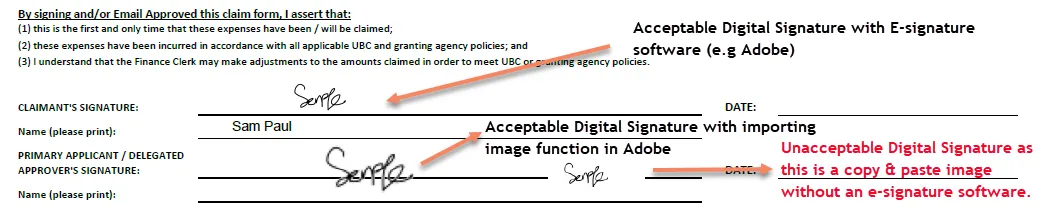
- Digital signatures must be signed with the proper signing tool (e.g. Adobe). Copy and Past e-signature images are NOT ACCEPTABLE per below sample.
- Claimant must certify the expenses are for UBC Student Group related business and that it will not be claimed elsewhere. Claimant must sign/email approve the claim forms submitted especially when the other team members submitted on behalf of the claimant.
Image
- All claims must be supported by appropriate documentations for audit purposes.
- Refer to the "Appropriate Supporting Documents" section for details.
- All supporting documents are complete, legible, and separated (adhesive notes, itemized receipts, credit card slip must be separated and scanned individually).
- UBC will only reimburse eligible purchases to the claimant that pay for the purchases. Separate claim form will be needed for each team member. One team member cannot claim on behalf of others.
- Expenses in foreign currency: Proof of exchange rate will be required. Identify the exchange rate used by attaching evidence such as redacted credit card statement or print out from online resources (e.g. Bank of Canada or Oanda) on the date the expenses were incurred.
- Add or Update banking information in Workday to receive reimbursement. Instruction can be found here.