Reimbursement Claims:
All reimbursement claims must be submitted within 60 days from the invoice, receipt, or shipping date. Each claim must include a completed and fully approved expense claim form, all required supporting documents, and proof of foreign currency when applicable.
All Engineering Design Teams must complete the “APSC Team Application Form” and obtain necessary digital approvals every September for APSC Finance to validate the signatures on the reimbursement claim forms.
Steps to Submit Reimbursement Claims:
- Complete Expense Claim Form based on your student group type. Use the excel form and convert to PDF for signature or use the PDF version. These forms can also be viewed and downloaded from the “Finance, Forms, Templates and Contacts” section.
- For Engineering Design Teams:
- For All Other Student Groups
- For Travel and Conference and PD Opportunities (NON-DESIGN TEAMS)
- Obtain appropriate signatures or email approvals for the claims:
- For Engineering Design teams, approvals from claimant, team’s designated approver, and Faculty Advisor.
- For All Other Student Groups, approvals from claimant and supervisor/budget owner.
- For Non-EDT PAF, approvals from claimant and PAF applicant.
NOTE: Claimant cannot sign/approve own claims. An alternate approver must sign off.
Image
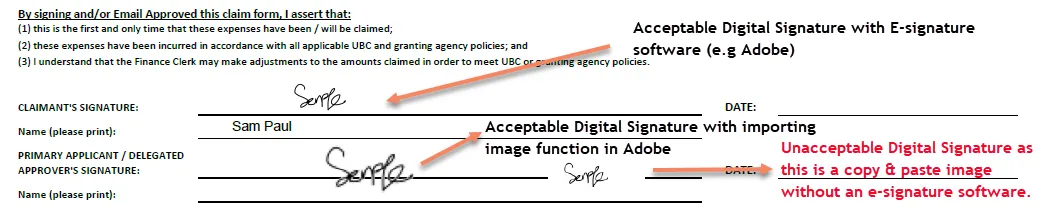
- Compile the claim form and appropriate supporting documentations, email them to APSC Finance for review and process.
- All claims must be supported by appropriate documentations for audit purposes.
- All supporting documents are complete, legible, and separated (adhesive notes, itemized receipts, credit card slip must be separated and scanned individually). Supporting documents must be in PDF or JPG format.
- Expenses in foreign currency: Reimbursements will only be issued in Canadian dollars (CAD). For foreign transactions, proof of exchange rate will be required. Identify the exchange rate used by one of the following options:
- attaching evidence such as redacted credit card statement, or
- print out from online resources, such as (Bank of Canada or Oanda) on the date the expense were incurred, or
- inform APSC Finance to use Workday exchange rate on the date the expense were incurred.
- Ensure claimant to add/update banking information on Student Workday to receive the reimbursement electronically.
- UBC will only reimburse eligible purchases to the claimant that paid for the purchases. Separate claim form will be needed for each team member. One team member cannot claim on behalf of others.
- The processing time for complete, error-free reimbursement claims is approximately two weeks. An automatic email notification will be sent to the email address associated with your student Workday profile once the claim is approved for payment.